Guides · 6 min read
How to make a lookbook
A lookbook shows a collection the way you want it seen. Done well, it sells a mood as much as the pieces themselves. Here is how to plan, shoot, design and share one, whether you are a student, a new label or an established brand.
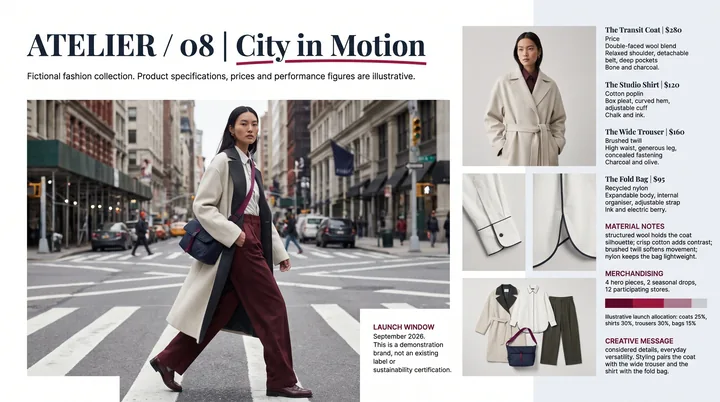
What a lookbook is, and what it is not
A lookbook is a curated set of images showing the outfits, or looks, from a collection. It is used to pitch to buyers and press, to show a portfolio, and to give customers a feel for the season.
It is different from a line sheet, which is a plain sales document listing each item with style numbers, colours, sizes and prices for wholesale buyers. It is also different from a catalogue, which aims to show every product for sale. Many brands send a lookbook and a line sheet together: one to inspire, one to order from.
Step 1: define the story
Before you plan a single shot, decide what the collection is about. Write a short paragraph on the inspiration, the mood and the person who wears it. Collect references into a moodboard: colours, locations, poses, lighting, typography.
This becomes your brief for the photographer, the stylist and the designer. It also keeps the lookbook coherent. Every page should feel like it belongs to the same world.
Step 2: plan the looks and the shot list
List every look you want to show and decide its order. A common approach is to open with a strong signature look, group pieces by colour, fabric or theme, and close on something memorable.
For each look, plan at least one full length shot and, where it helps, details: fabric close ups, hardware, prints, the back of a garment. Buyers and press appreciate seeing how something is made, not just how it looks from a distance.
- Full length shot for every look.
- Detail shots of fabrics, trims and finishes.
- A few mood or location images to set the scene.
- Optional flat lays or still life images for accessories.
Step 3: shoot with consistency
Consistency matters more than a big budget. Keep lighting, framing and backdrop consistent within each section so the clothes, not the setup, change from page to page. A plain studio backdrop is a safe choice for a first collection; a location adds atmosphere but needs more planning.
Shoot more than you need, and in high resolution. You will crop for different layouts later, and print or large screens will show every soft edge.
Think about casting and styling as part of the story. The model, hair, makeup and the way each garment is pinned and steamed all shape how the collection reads. Take a quick phone photo of each finished look before it goes in front of the camera, so you have a record of exactly how it was styled.
Sequencing the looks
Once the shoot is done, lay out every selected image in order before you start designing. Printing small thumbnails or dragging images around a single board makes it easy to see the flow.
Look for rhythm. Alternate busy and quiet images, wide and close shots, and avoid placing two near identical looks side by side unless you want a deliberate pair. Check that colours move gradually rather than jumping back and forth.
Then cut. A lookbook that shows every frame you love quickly feels repetitive. Keep the strongest image of each look and a few details, and save the rest for social media or press requests.
Step 4: design the pages
Think of a lookbook as an editorial publication rather than a slideshow. Mix layouts: a full bleed image on one page, a pair of looks side by side on the next, a grid of details after that. The rhythm keeps people turning pages.
Keep type minimal and elegant. A cover with the brand name and season, short section titles, and small captions with look numbers are usually enough. If the lookbook goes to buyers, add style numbers or a simple reference so they can find each item on your line sheet.
Leave plenty of white space and resist filling every gap. Restraint is what makes luxury lookbooks feel expensive.
Step 5: export and share
PDF is the standard format for sending lookbooks to buyers and press. Make a high quality version for print or showroom screens and a lighter one for email, and check that file names include your brand and season.
If you present the collection in meetings, keep a slide version too, so you can talk through looks one at a time on a big screen.
Making a lookbook with PPTlover
If you do not have a designer, or you want to explore directions before a shoot, PPTlover can help. Describe your collection, pieces, colours and mood in a short brief, or upload your own notes and images, and choose one of its fashion or editorial styles. It designs magazine style pages with campaign imagery, material details and considered typography.
Export a PDF lookbook to share with buyers, a PowerPoint (.pptx) to present in a showroom, or images for social media, in 2K or Ultra sharp 4K for print and large screens. Your first slide is free to try.